Stop Angler Phishing: Secure Social Media Support Channels
Attackers hijack brand support accounts on social platforms to steal credentials, bypassing traditional email security filters entirely.
Secure your official social media profiles by enabling two-factor authentication and verifying account ownership. Monitor for impersonator accounts that mimic your support channels. Train staff to recognize that legitimate support will never ask for passwords via direct message.
The Support Channel Trap
Imagine a customer with a billing issue. They do not open their email client. They search for your brand on a social platform and click the message button on your official profile. An attacker has already compromised that profile. The response comes instantly, asking for login details to "verify" the account. The customer complies. You lose a user, and the attacker gains access.
This is angler phishing. It mimics fishing. The attacker casts a line into a pool of potential victims on social media. They wait for a bite. Unlike email phishing, this traffic never touches your mail server. Your spam filters see nothing. Your security awareness training for email is irrelevant here. The attack happens in a platform where security controls are minimal and user trust is high.
Why Traditional Defenses Fail
You likely invest heavily in email security gateways. These tools scan headers, analyze links, and block known malicious domains. They work well for inbox threats. They do nothing for social media direct messages. The protocol is different. The context is different. The user expectation is different.
Users expect instant responses on social platforms. They expect casual conversation. When a support agent asks for a password in a chat, it feels normal. In an email, it feels suspicious. This psychological shift is the attacker’s advantage. You cannot rely on perimeter defenses here. You must secure the identity of the support channel itself.
Secure the Official Profile First
The first step is to ensure the attacker cannot take over your official account. If they do, they become the trusted source. They can reset passwords for customers. They can exfiltrate data. The damage is immediate and severe.
Enforce multi-factor authentication on all social media administrative accounts. Use phishing-resistant authentication methods where possible. Do not rely on SMS codes, which can be intercepted. Use hardware keys or authenticator apps. Restrict access to these accounts to a small, dedicated team. Rotate credentials regularly. If an employee leaves, revoke their access immediately.
Monitor login activity for anomalies. Logins from unusual locations or at odd hours indicate a compromise. Set up alerts for any changes to account settings, such as email addresses or phone numbers. These are often the first signs of a takeover.
Detect and Discredit Impersonators
Attackers often create fake profiles that look identical to yours. They use your logo, your name, and your handle with slight variations. They wait for users to message them. You must find and report these accounts before they cause harm.
Perform regular searches for your brand name. Look for profiles with new creation dates or low follower counts. Check the profile images for low resolution or artifacts. Verify the handle spelling. Report imposters to the platform. Most major platforms have processes for brand impersonation. Use them aggressively.
Consider using platform verification badges if available. These signal to users that the account is authentic. While not a complete solution, it adds a layer of trust. It helps users distinguish between the real support channel and a fake one.
Train Users to Verify, Not Just Trust
Your staff and customers need to know how to verify identity. Trust is not enough. Verification is required. Teach users to look for specific indicators of legitimacy.
Legitimate support will never ask for your password. Ever. If a support agent asks for it, it is a scam. Legitimate support will not ask for sensitive data via direct message. They will direct you to a secure portal or use a verified callback method.
Encourage users to check the URL of any link provided. Do not click. Hover or inspect. If the link does not point to your official domain, do not use it. Report the interaction. This applies to both customers and internal staff who manage social media.
Implement Technical Monitoring
Manual checks are not enough. You need automated monitoring. Use tools that track mentions of your brand across social platforms. Look for spikes in activity or unusual keywords.
Monitor for keywords like "support," "help," "reset," or "login" in relation to your brand. If a fake account is active, users will likely use these terms. Set up alerts for these patterns. Investigate quickly.
Integrate social media monitoring with your security operations. If a compromised account is detected, trigger an incident response. Revoke access. Reset credentials. Notify users. Speed matters. The longer an attacker controls a support channel, the more damage they do.
What Does Not Work
Relying solely on user reporting is ineffective. Most users do not report scams. They simply comply or leave. You must take proactive steps. Passive defense fails here.
Do not assume that platform security is sufficient. Social media platforms prioritize engagement over security. They have limited resources for brand protection. You must do the work yourself.
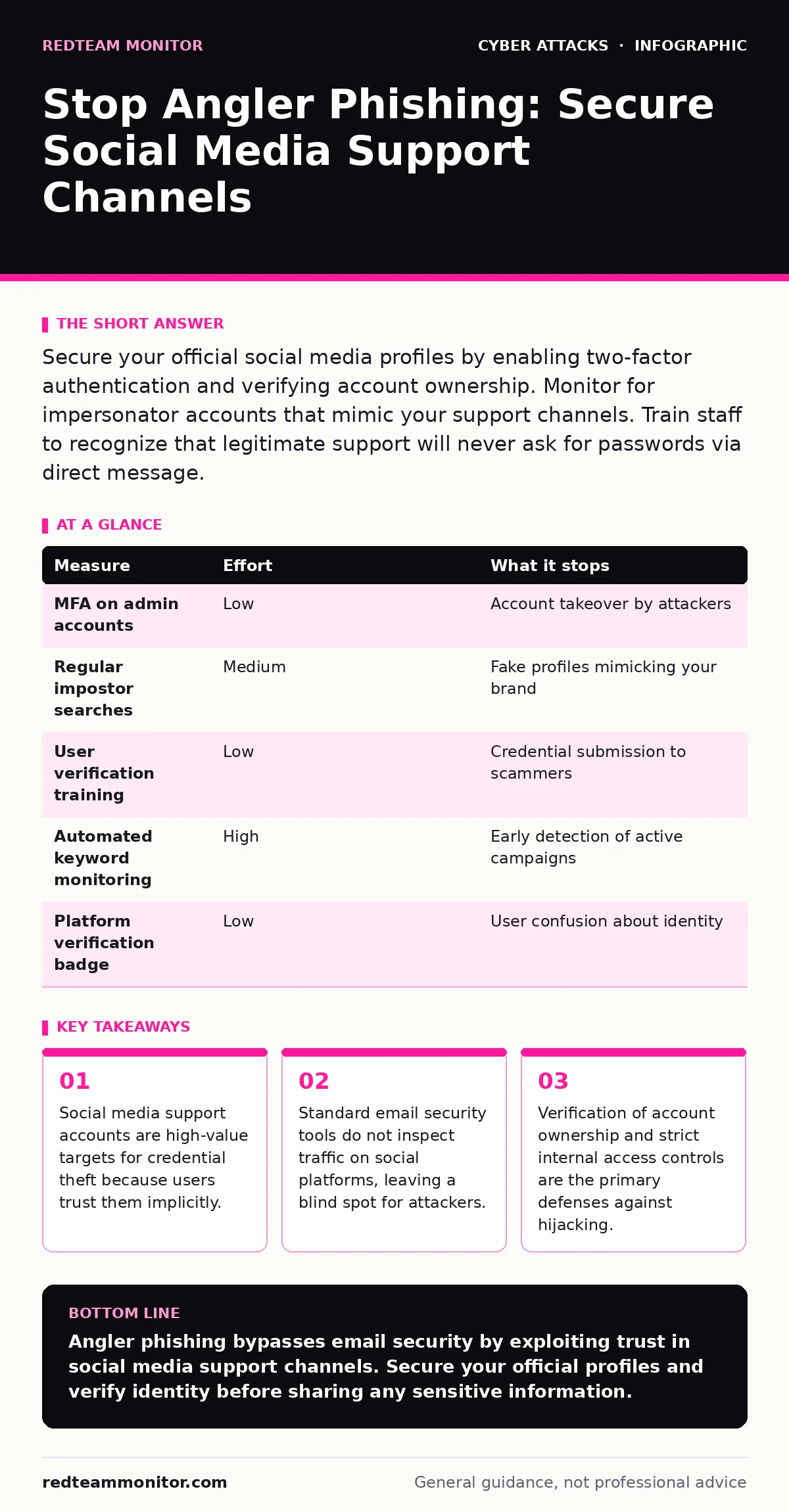
Measure and Effort Matrix
| Measure | Effort | What it stops |
|---|---|---|
| MFA on admin accounts | Low | Account takeover by attackers |
| Regular impostor searches | Medium | Fake profiles mimicking your brand |
| User verification training | Low | Credential submission to scammers |
| Automated keyword monitoring | High | Early detection of active campaigns |
| Platform verification badge | Low | User confusion about identity |
Closing Checklist
Use this checklist to secure your support channels today.
- Enable multi-factor authentication on all social media admin accounts.
- Search for and report three impersonator accounts mimicking your brand.
- Update your social media support policy to explicitly forbid password requests.
Key takeaways
- Social media support accounts are high-value targets for credential theft because users trust them implicitly.
- Standard email security tools do not inspect traffic on social platforms, leaving a blind spot for attackers.
- Verification of account ownership and strict internal access controls are the primary defenses against hijacking.
Angler phishing bypasses email security by exploiting trust in social media support channels. Secure your official profiles and verify identity before sharing any sensitive information.
Frequently asked questions
Can I block direct messages on my official account?
You can limit who can message you, but blocking all messages hurts customer service. It is better to train users and monitor for scams.
How do I know if a social media profile is fake?
Look for recent creation dates, low follower counts, and slight spelling errors in the handle. Fake profiles often lack a history of genuine engagement.
Should I use a specific tool for monitoring?
Many security platforms offer social media monitoring features. Choose one that integrates with your existing workflow and alerts on brand mentions.
What if my official account is already compromised?
Revoke all access immediately. Reset passwords. Enable multi-factor authentication. Notify your users and the platform. Investigate the extent of the breach.
How this guide was produced: written by the RedTeam Monitor editorial team with AI assistance, checked against the public references listed below, and reviewed when the facts change. See our editorial policy or report an error.