How Brand Impersonation Works: The 5-Step Attack Chain
Brand impersonation succeeds not by breaking encryption, but by exploiting the human tendency to trust familiar logos and expected communication patterns.
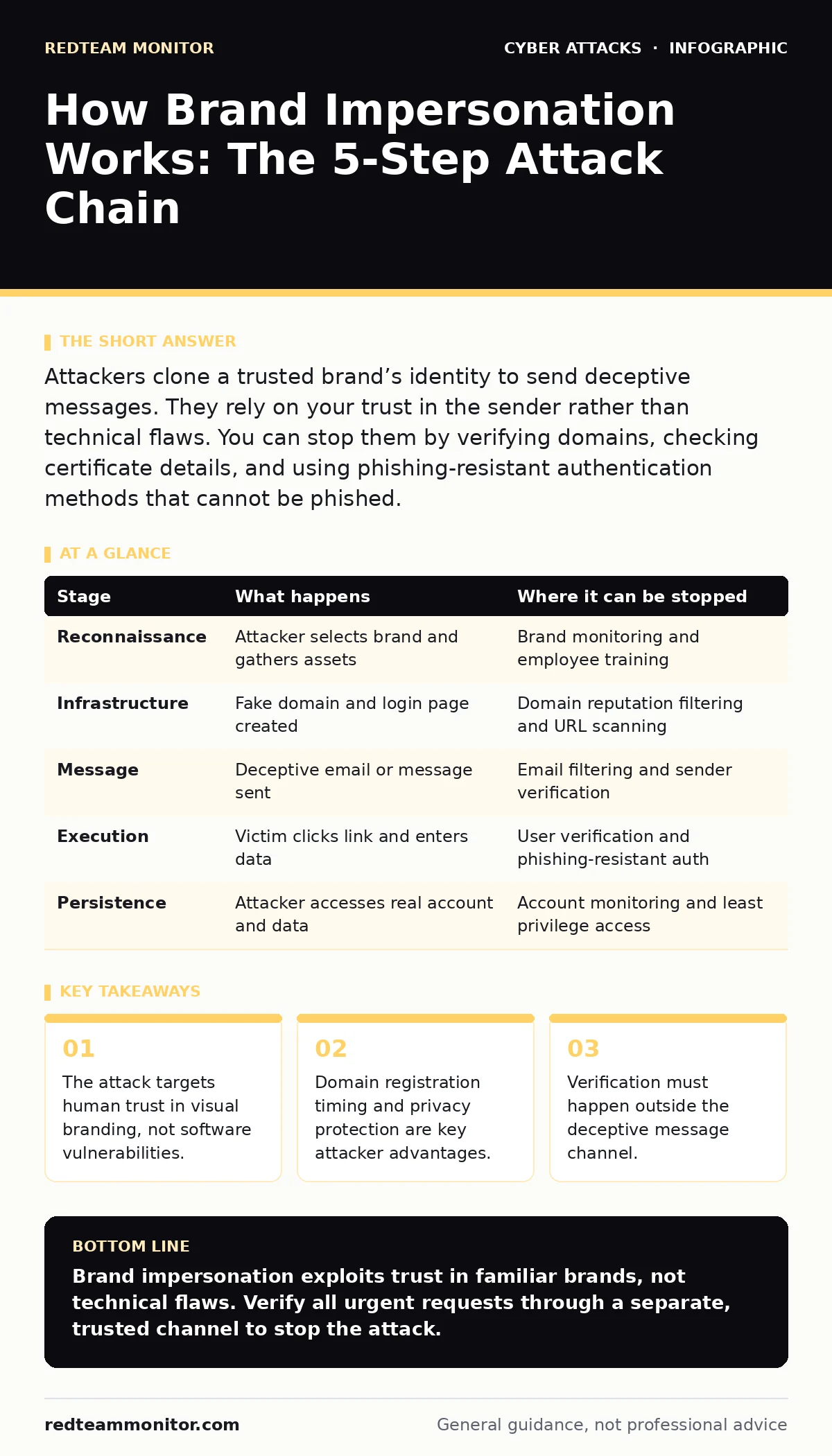
Attackers clone a trusted brand’s identity to send deceptive messages. They rely on your trust in the sender rather than technical flaws. You can stop them by verifying domains, checking certificate details, and using phishing-resistant authentication methods that cannot be phished.
The Anatomy of Trust Exploitation
Brand impersonation is a social engineering technique where an attacker mimics a legitimate organization to deceive a recipient. Unlike technical exploits that target code, this method targets the psychological shortcut your brain uses to identify safe communications. You see a familiar logo or a known sender name, and you lower your defenses. The attacker relies on this automatic trust to bypass your skepticism.
This approach is distinct from supply chain attacks, which compromise software before it reaches you. Here, the deception happens in transit, usually via email or messaging platforms. The goal is often credential theft or malware delivery. Understanding the step-by-step process reveals where the chain is weakest.
### Stage 1: Reconnaissance and Identity Selection
The attacker begins by identifying a high-value brand within your ecosystem. They look for vendors you use frequently, such as cloud providers, payment processors, or HR platforms. These brands carry inherent authority. An email from "IT Support" or a major software vendor triggers immediate attention.
The attacker gathers visual assets. They download logos, copy email signatures, and note the tone of voice used in legitimate communications. They may also monitor public job postings to find employee names for realistic sender identities. This stage requires no technical skill, only patience and observation.
### Stage 2: Infrastructure Setup
With a target brand chosen, the attacker prepares the delivery mechanism. The most common method is registering a domain name that looks similar to the legitimate one. This is known as typosquatting. For example, if the real domain is example.com, the attacker might register examp1e.com or example-support.com.
They configure this domain with email services. They may also create a landing page that mirrors the real login portal. This page often uses HTTPS, which gives users a false sense of security. The padlock icon in the browser indicates an encrypted connection, not a safe one. This mirrors the setup seen in angler phishing, where attackers control the support channel entirely.
### Stage 3: The Deceptive Message
The attacker crafts the message. It must look identical to a real notification. They use the stolen logo and mimic the layout of legitimate alerts. The content usually creates urgency. A warning about account suspension or a request to verify billing details works well.
The message contains a call to action. This is a link to the fake login page or an attachment containing malware. The sender address is often spoofed to match a real employee or department. However, the technical headers will reveal the true origin. Most recipients do not check these headers.
### Stage 4: Execution and Credential Harvesting
You click the link. You are directed to the attacker’s server. The page looks exactly like the real login screen. You enter your username and password. The moment you submit the form, the data is sent to the attacker.
Some sophisticated attacks include a second step. They may ask for a multi-factor authentication code. If you provide it, the attacker can bypass standard phishing-resistant authentication failures by using the code in real-time. This is why one-time codes are not enough. True security requires hardware keys or certificate-based methods that cannot be intercepted.
### Stage 5: Persistence and Lateral Movement
With your credentials, the attacker logs into the real service. They may change your password to lock you out. They might enable forwarding rules to steal future emails. From there, they move laterally within your organization.
This stage often involves API abuse. The attacker uses your legitimate credentials to access data via application programming interfaces. They can download customer records or financial data without triggering traditional security alerts. The activity looks like normal user behavior because it is authorized.
Interruption Points and Defense
You can interrupt this chain at multiple stages. Detection is the first line of defense. Email security tools can flag domains registered recently or those with poor reputation scores. However, these tools are not perfect.
Verification is the most reliable stop. Never trust the content of the message. If you receive an urgent request, navigate to the service manually. Type the URL into your browser or use a bookmark. Do not click links in the email.
The Hidden Cost of Trust
Brand impersonation works because it exploits a fundamental aspect of human cognition. We trust patterns. We trust consistency. The attacker weaponizes this trust. Defending against it requires a shift in behavior. You must assume that any unsolicited message is potentially malicious.
This is similar to the mindset needed for callback verification. In high-stakes operations, you verify the identity of the requester through a separate, trusted channel. You do not trust the medium of the request. You trust the process of verification.
Technical Limitations and Workarounds
Spoofing protections like DMARC, DKIM, and SPF help, but they are not silver bullets. Attackers can bypass them by using subdomains or by compromising legitimate accounts. If an attacker steals a real employee’s credentials, their emails will pass all technical checks.
This is why password spraying is a common precursor. Attackers try common passwords across many accounts. Once they get in, they have a legitimate foothold. They can then send phishing emails that look completely real. Defending against this requires strong, unique passwords and multi-factor authentication.
Behavioral Signals to Watch
Look for subtle inconsistencies. Check the sender’s email address carefully. Is it from a free email provider? Is the domain slightly misspelled? Check the greeting. Does it use your name, or a generic "Dear User"?
Legitimate brands rarely ask for sensitive information via email. They will not ask for passwords or full credit card numbers. If a message demands immediate action, pause. Take a moment to verify. This small delay can break the attacker’s momentum.
| Stage | What happens | Where it can be stopped |
|---|---|---|
| Reconnaissance | Attacker selects brand and gathers assets | Brand monitoring and employee training |
| Infrastructure | Fake domain and login page created | Domain reputation filtering and URL scanning |
| Message | Deceptive email or message sent | Email filtering and sender verification |
| Execution | Victim clicks link and enters data | User verification and phishing-resistant auth |
| Persistence | Attacker accesses real account and data | Account monitoring and least privilege access |
The Role of Authentication
Strong authentication is the final barrier. If an attacker steals your password, they still need to bypass authentication. Traditional multi-factor authentication, like SMS codes, can be phished. Attackers can redirect you to a real login page after stealing your password, then ask for your code.
You need phishing-resistant authentication. This includes hardware security keys or certificate-based authentication. These methods bind the authentication to the specific device and domain. They cannot be redirected or intercepted. This stops the attack even if you click the link.
Conclusion of the Chain
Brand impersonation is a persistent threat because it adapts. As defenses improve, attackers become more sophisticated. They use AI to write better emails. They use advanced domain generation algorithms to evade filters.
Your defense must also adapt. Technology alone is not enough. You need a culture of verification. You need to question the source, not just the content. By understanding the steps, you can identify the weak points. You can interrupt the chain before it completes.
Key takeaways
- The attack targets human trust in visual branding, not software vulnerabilities.
- Domain registration timing and privacy protection are key attacker advantages.
- Verification must happen outside the deceptive message channel.
Brand impersonation exploits trust in familiar brands, not technical flaws. Verify all urgent requests through a separate, trusted channel to stop the attack.
Frequently asked questions
How do I know if an email is spoofed?
Check the sender’s email address carefully. Look for slight misspellings or unexpected domains. Do not rely on the display name, which can be easily faked.
Can antivirus software stop brand impersonation?
Antivirus can detect malware attached to phishing emails, but it cannot stop the social engineering aspect. It cannot prevent you from clicking a link or entering credentials on a fake site.
What is the difference between brand impersonation and spear phishing?
Brand impersonation targets a broad audience using a trusted brand’s identity. Spear phishing is targeted at specific individuals with personalized content. Both use deception, but the scope differs.
Why is DMARC not enough?
DMARC prevents attackers from using your domain, but it does not stop them from using similar domains or compromised accounts. It is a technical control, not a behavioral one.
How this guide was produced: written by the RedTeam Monitor editorial team with AI assistance, checked against the public references listed below, and reviewed when the facts change. See our editorial policy or report an error.