Should I do firmware updates? Risks, benefits, and safe execution
Firmware updates patch hardware-level trust boundaries, but they also introduce supply chain risks that require verification before installation.
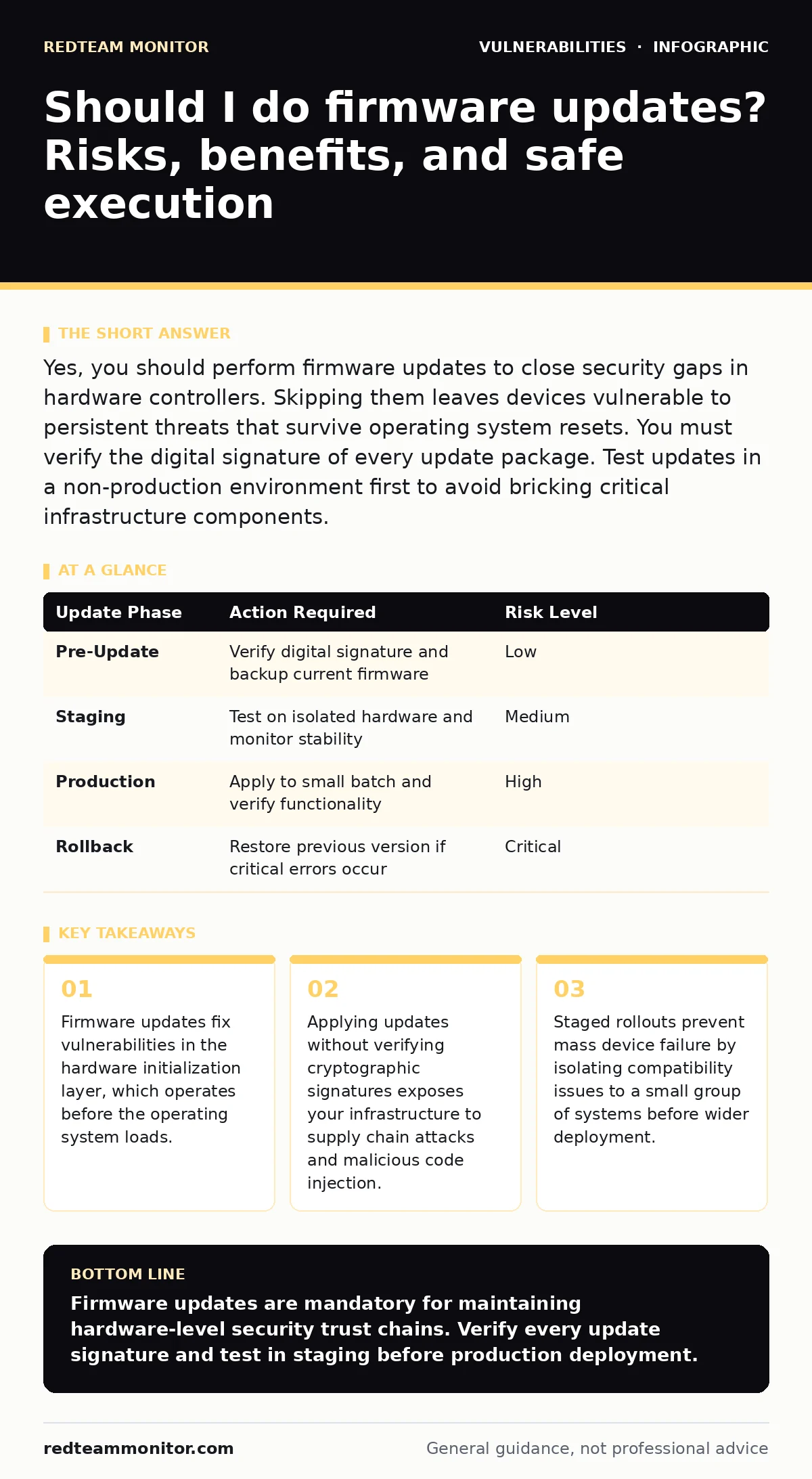
Yes, you should perform firmware updates to close security gaps in hardware controllers. Skipping them leaves devices vulnerable to persistent threats that survive operating system resets. You must verify the digital signature of every update package. Test updates in a non-production environment first to avoid bricking critical infrastructure components.
Should i do firmware updates
You should perform firmware updates to maintain the security integrity of your hardware infrastructure. Firmware resides in non-volatile memory on devices like routers, servers, and network switches. It controls low-level hardware functions that the operating system cannot manage. Leaving firmware outdated leaves known vulnerabilities open to exploitation. Attackers can use these flaws to gain persistent access that survives standard security resets.
Why firmware matters more than software
Firmware operates at a higher privilege level than standard application software. It initializes hardware components during the boot process. If an attacker compromises the firmware, they control the device before security agents load. This persistence makes detection and removal extremely difficult. Standard antivirus tools often cannot scan firmware partitions. Updating firmware closes these deep-layer access points. It ensures the hardware trust chain remains intact from power-on to system start.
The hidden cost of delayed patches
Delaying firmware updates creates a growing attack surface over time. Manufacturers release patches for discovered flaws in hardware drivers and controllers. These flaws might allow remote code execution or privilege escalation. An unpatched device can serve as a pivot point for lateral movement within your network. The cost of a breach far exceeds the downtime required for maintenance. Proactive updating reduces the window of opportunity for attackers to exploit known weaknesses.
Verifying update integrity before installation
You must verify the digital signature of every firmware package before installation. Manufacturers sign updates with a private key to prove authenticity. Your device verifies this signature using a public key stored in the firmware. This process ensures the code has not been tampered with during transit. Skipping verification exposes you to supply chain attacks where malicious code replaces legitimate updates. Always download updates from official manufacturer channels, not third-party mirrors.
Testing compatibility in isolated environments
Firmware updates can introduce incompatibilities with existing hardware or software configurations. Testing in an isolated environment prevents widespread service disruption. Create a staging area that mirrors your production setup. Install the update on a single device first. Monitor system stability, performance metrics, and peripheral functionality. If the device behaves normally, proceed with a small batch rollout. This staged approach limits the impact of any unexpected failures.
See also: Automatic Updates Mistakes That Leave Systems Exposed
Managing the rollback strategy
You need a defined rollback plan for every firmware update. Updates can fail due to power loss, corrupted files, or hardware conflicts. Without a rollback mechanism, a failed update may brick the device. Keep previous firmware versions archived and accessible. Ensure your recovery tools are compatible with the older version. Document the steps required to restore the previous state. This preparation minimizes downtime and ensures business continuity during maintenance windows.
| Update Phase | Action Required | Risk Level |
|---|---|---|
| Pre-Update | Verify digital signature and backup current firmware | Low |
| Staging | Test on isolated hardware and monitor stability | Medium |
| Production | Apply to small batch and verify functionality | High |
| Rollback | Restore previous version if critical errors occur | Critical |
Balancing security with operational stability
You must balance the urgency of security patches with operational stability. Critical security updates require immediate attention to close severe vulnerabilities. Non-critical updates can be scheduled during maintenance windows. Evaluate the severity of the vulnerability disclosed by the manufacturer. High-severity flaws often require emergency patching. Lower-severity updates can wait for the next planned maintenance cycle. This prioritization prevents unnecessary disruption while maintaining security posture.
Long-term maintenance and decommissioning
Firmware support eventually ends for older hardware models. Manufacturers stop releasing security patches for legacy devices. These devices become permanent security liabilities in your infrastructure. Plan for the decommissioning or replacement of unsupported hardware. Keep an inventory of firmware versions and end-of-life dates. This foresight prevents security gaps from emerging due to abandoned technology. Regular reviews of your hardware lifecycle ensure you stay ahead of support expiration.
Advanced considerations for complex environments
Complex environments require more rigorous firmware management strategies. Virtualization platforms and hypervisors rely on host firmware for isolation. A compromised host firmware can break virtual machine boundaries. This leads to potential cross-tenant data leakage. Additionally, embedded systems in IoT devices often have limited update mechanisms. These devices may lack secure boot features or signature verification. You must isolate such devices on separate network segments. This containment limits the blast radius of any potential compromise.
Key takeaways
- Firmware updates fix vulnerabilities in the hardware initialization layer, which operates before the operating system loads.
- Applying updates without verifying cryptographic signatures exposes your infrastructure to supply chain attacks and malicious code injection.
- Staged rollouts prevent mass device failure by isolating compatibility issues to a small group of systems before wider deployment.
Firmware updates are mandatory for maintaining hardware-level security trust chains. Verify every update signature and test in staging before production deployment.
Frequently asked questions
Can a firmware update remove malware?
Firmware updates can patch vulnerabilities that malware exploits, but they do not directly remove existing malware. You must scan and clean the operating system and applications separately to eliminate active infections.
How often should I check for firmware updates?
Check for firmware updates monthly or whenever a critical security advisory is released. Regular checks ensure you are aware of new vulnerabilities and available patches without causing unnecessary operational disruption.
What happens if I install the wrong firmware version?
Installing the wrong firmware version can brick the device, making it unusable. Always verify the exact model number and hardware revision before downloading. Keep a backup of the current firmware to enable recovery if the installation fails.
Do firmware updates affect my data?
Firmware updates generally do not affect user data stored on drives. However, they may reset device configuration settings to factory defaults. Always back up your configuration files and critical data before performing any firmware maintenance.
How this guide was produced: written by the RedTeam Monitor editorial team with AI assistance, checked against the public references listed below, and reviewed when the facts change. See our editorial policy or report an error.